HivemindOSDownload

Product roadmap

What we're
building next.

HivemindOS gives you one place to run, watch, and guide your AI agents—across your computers, with shared memory and clear control over important actions.

Updated August 5, 2026 People stay in control

00 / Now

Where things stand

A public snapshot of the product today. Release order reflects our current priorities, but timing can move when an app review, safety test, or reliability issue takes longer than expected.

Up next

Socials workspace

Working in development and the next major product experience to finish.
With Apple

Mobile 1.0.2

Submitted and waiting for App Store approval.

Paper testing

Agentic copy trading

Not yet consistently profitable and unable to promote itself to live trading.

Coming together

Content Studio

One place for images, video, animation, voice, music, and complete workflows.

Desktop milestone

V1

The next major release after public desktop v0.4.5.

01–08 / Flight plan

The roadmap

What people will be able to do, in the order we are focused on bringing it to life.

01In progress

Socials Command Center

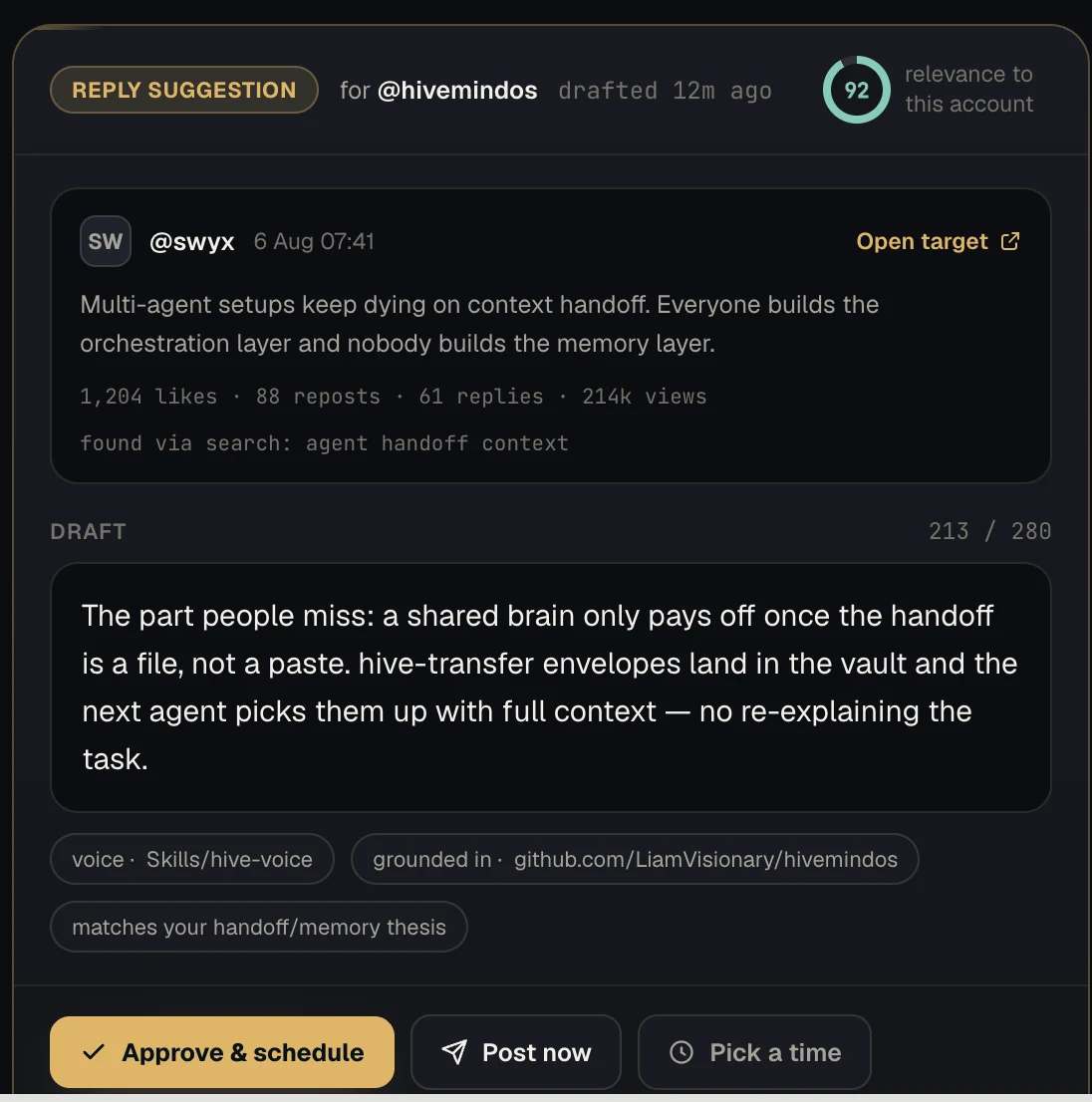
Socials will give you one place to plan and run social accounts with your agents.
What you will be able to do

  • Connect multiple social accounts without mixing their identity, voice, drafts, or posting history.
  • Let an agent draft a pack of posts based on that real context.
  • Review, edit, approve, schedule, or discard every draft from one queue.
See 5 more
  • Give each account its own websites, files, notes, and brand context.
  • See your week on a calendar and move scheduled posts around.
  • Track published posts and account analytics.
  • Find relevant conversations and draft replies or quote posts for review.
  • Let an account automatically publish original posts when you want it to.
StageSocials review queue
PlanBuildTestShip
HivemindOS Socials Command Center showing account filters, the review queue, publishing controls, and agent work settings

Manual review will stay the default. Automatic posting will be a clear choice for each account, with a visible cancellation window, posting hours, pause controls, and history. Replies and quote posts will still wait for individual approval.

02Submitted — waiting for App Store approval

HivemindOS Mobile Public Release

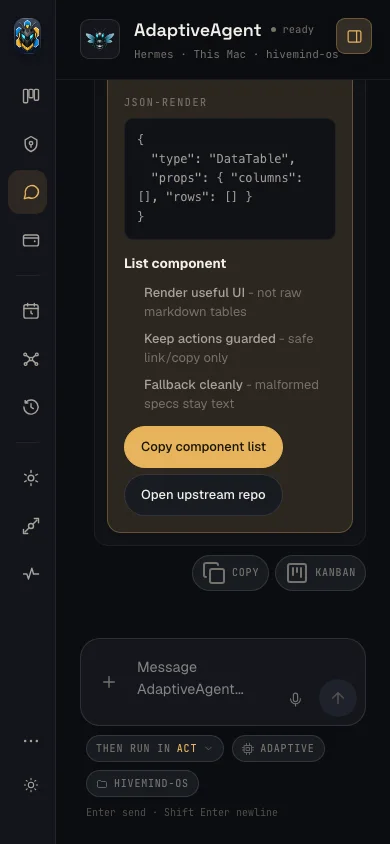
HivemindOS Mobile puts your agents in your pocket. You can talk to them, call them, check your fleet, and connect back to the agents running on your Mac or server.
What you will be able to do

  • Chat with agents from your phone wherever you are.
  • Pair the app with HivemindOS on your Mac and reach the same agents and shared memory.
  • Call agents with voice and use Siri, Shortcuts, or the Action Button for quick actions.
See 3 more
  • Use HivemindOS Cloud, connect another AI provider, use your own server, or run supported models on the phone.
  • Check important fleet activity, approvals, wallets, companies, and Shared Brain information from mobile.
  • Use free access, credits, or an Apple subscription for supported HivemindOS Cloud models.
StageMobile agent chat
PlanBuildTestShip
HivemindOS mobile chat with an agent and action controls
03In development and paper testing

Agentic Copy Trading

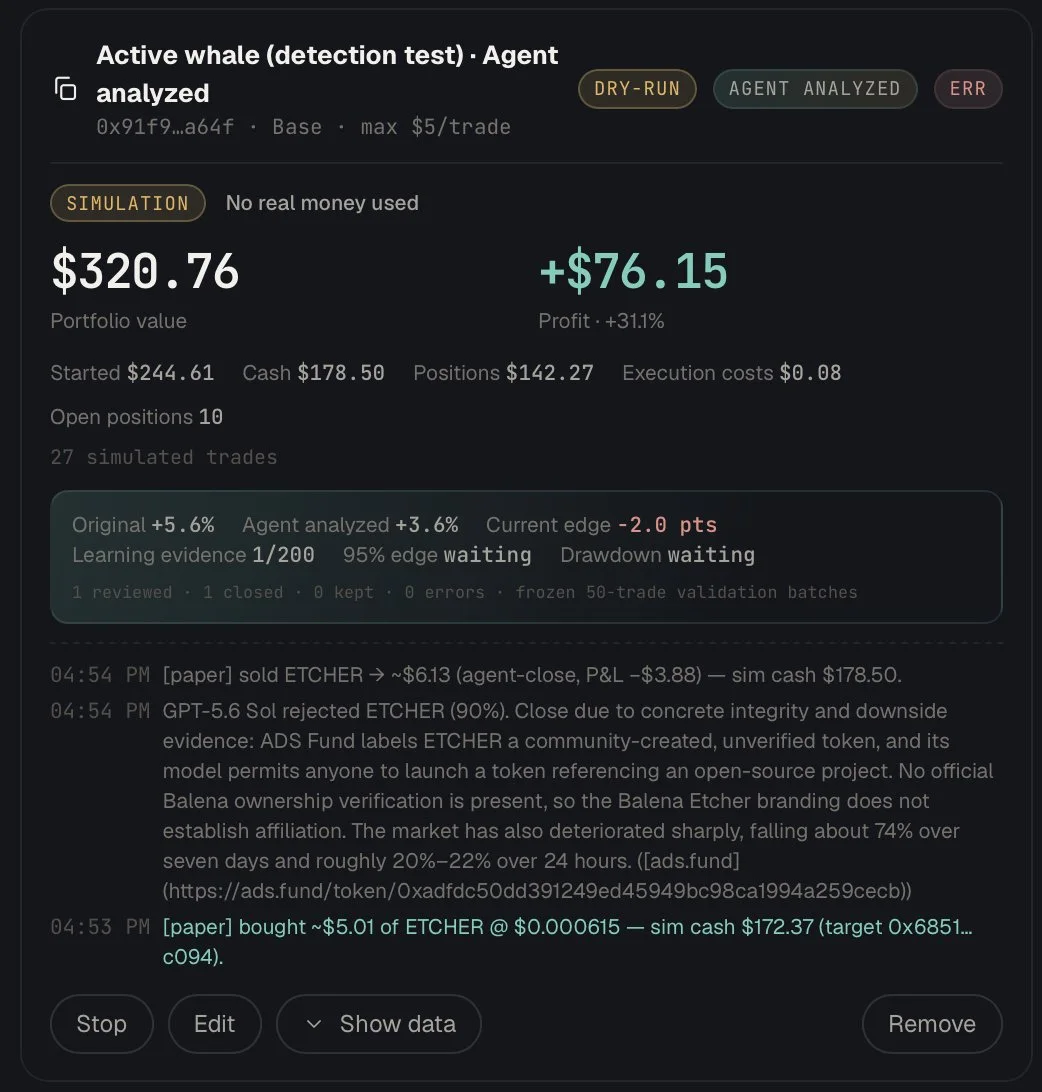
Agentic copy trading will let you follow a wallet while an AI agent researches each copied position, checks the risks, decides whether to keep or close it, and learns from how that decision performs.
What you will be able to do

  • Choose a wallet to follow and set clear limits before anything starts.
  • Run the strategy with paper money first.
  • Build an evidence-linked learning history from completed paper trades, sync it to Shared Brain, then use lessons from earlier test batches to improve later reviews.
See 6 more
  • Compare normal copy trading with a version reviewed by the agent while both follow the same source.
  • See what the agent found about the token, liquidity, market, and wallet history.
  • Read why the agent kept a position, closed it, or decided the evidence was unclear.
  • Revisit every paper decision after 24 hours and when the source wallet exits to see whether the agent helped, hurt, or missed upside.
  • See avoided losses, missed upside, profitable holds, losses held, returns, costs, drawdowns, and failed reviews without hiding bad results.
  • Stop the strategy, change its limits, or keep it in paper mode.
StagePaper trading review
PlanBuildTestShip
HivemindOS Agentic Copy Trading paper simulation showing portfolio results, learning evidence, trade activity, and agent analysis

Passing the paper test will only make the strategy eligible for another paper stage. Live trading will always require a separate user decision and a fresh safety review. There is no promise of future profit.

04In progress

Hivemind Content Studio

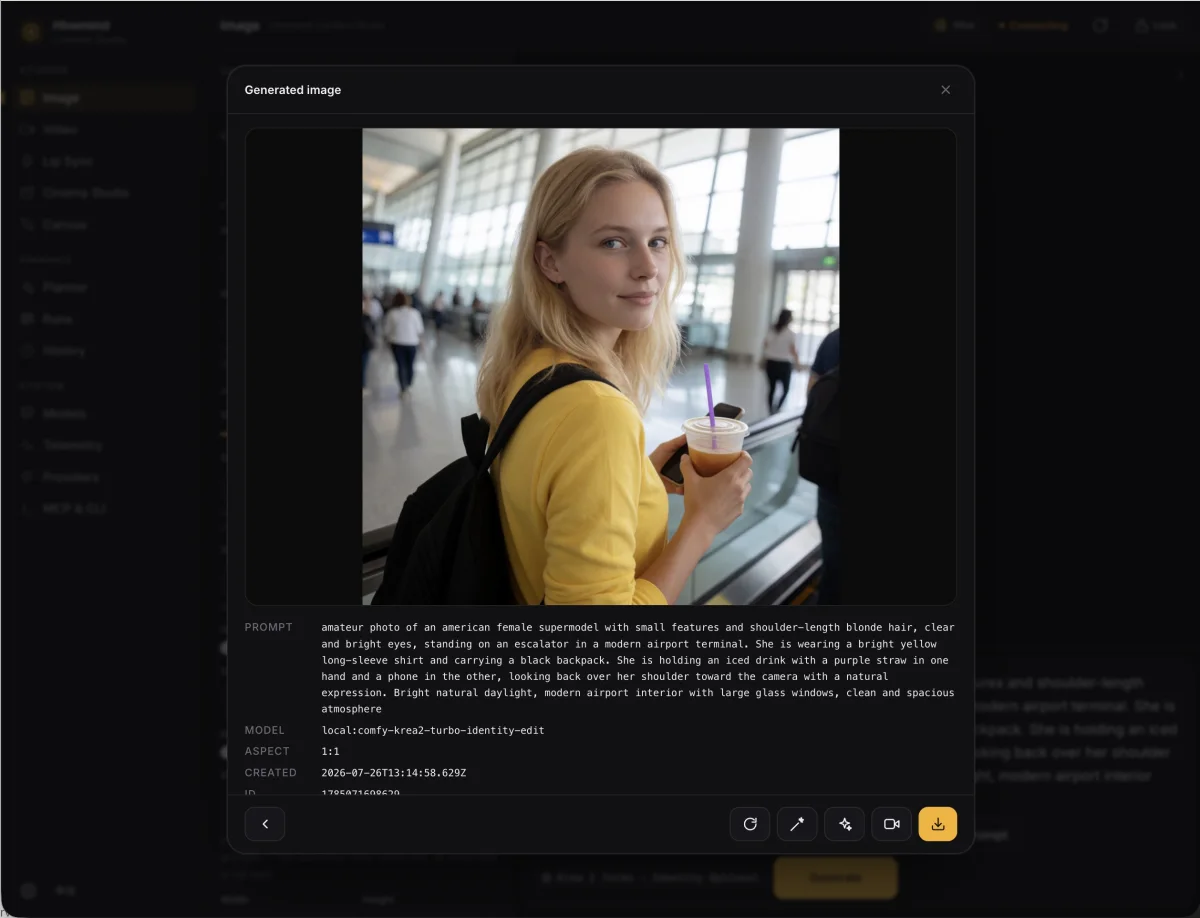
Hivemind Content Studio will give people and agents one place to create complete media projects. Start with a prompt, an idea, or reference files and carry the work through to finished content without jumping between disconnected tools.
What you will be able to do

  • Generate images, videos, animation, voice, music, captions, and sound.
  • Edit or extend existing images, audio, and video.
  • Turn an idea into a script, scenes, visuals, motion, narration, music, captions, and final exports.
See 6 more
  • Create short videos, ads, explainers, product content, social posts, and longer media workflows.
  • Give the Studio reference images and files so it can follow a real product, character, style, or brand.
  • Let HivemindOS choose an available model automatically or pick the model you want to use.
  • Use local models, your own connected providers, or HivemindOS hosted credits where available.
  • See what each generation may cost before approving paid work.
  • Keep your projects, prompts, versions, and finished files together so an agent can continue the work later.
StageGenerated image
PlanBuildTestShip
Hivemind Content Studio showing a generated image, its prompt, model details, and editing controls

Publishing will remain a separate, visible choice.

05Preparing for release

V1 Desktop App Release

V1 is the point where HivemindOS should feel dependable for someone installing it for the first time. The basic loop needs to work without hand holding: install the app, connect an agent, give it work, review what it wants to do, and understand what happened.
What V1 should deliver

  • A clear setup for one computer or a private group of connected computers.
  • Reliable Chat, Work, approvals, alerts, schedules, and agent history.
  • A Shared Brain where agents can remember useful context and hand work to each other.
See 4 more
  • A simple way to connect hosted models, subscription access, your own API keys, and local models.
  • App Builder projects that stay attached to the conversation and can be previewed, edited, exported, or deployed when you choose.
  • Clear controls and receipts for wallets, payments, and other important actions.
  • Updates that install safely and explain how to recover when something goes wrong.
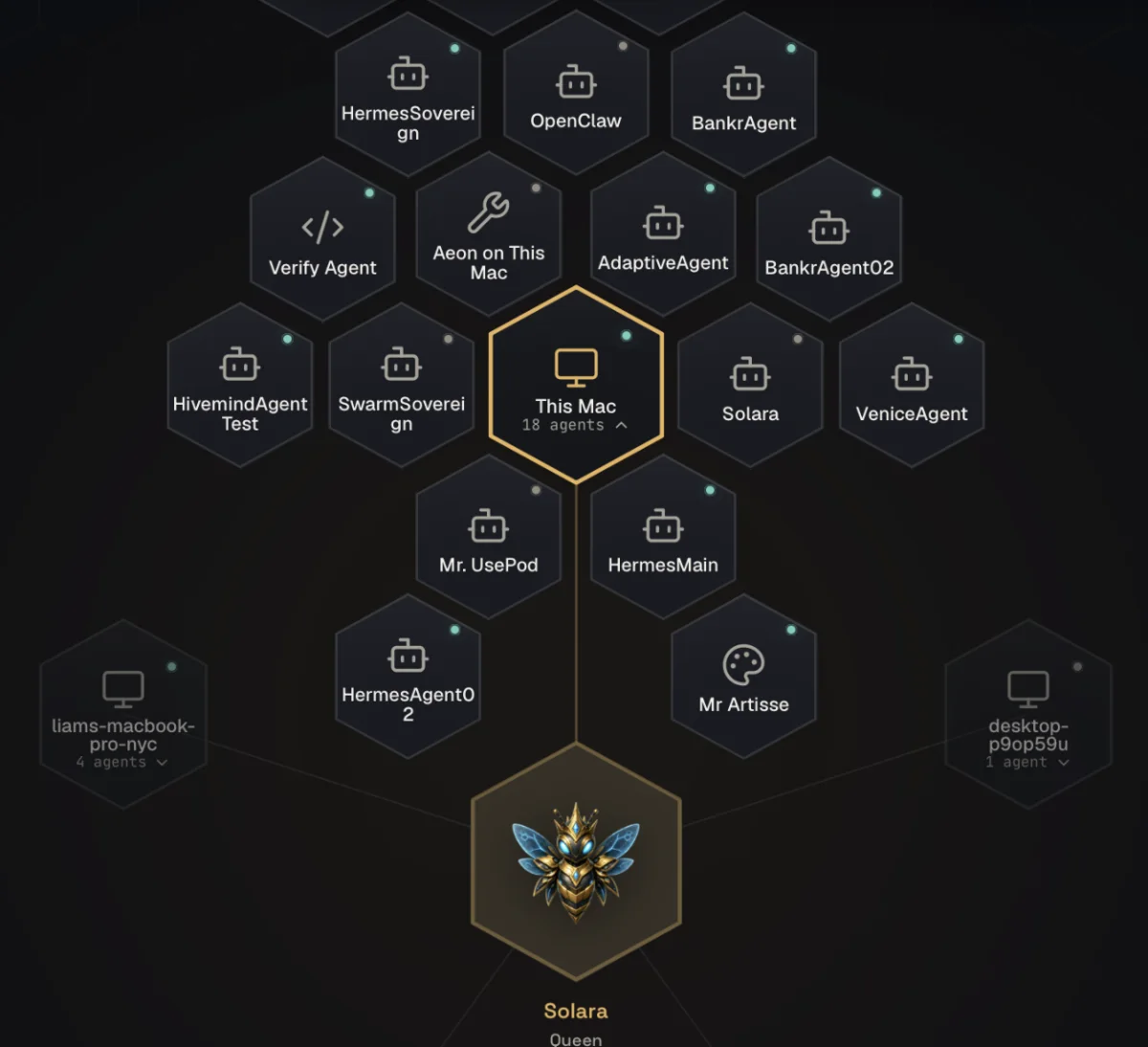
StageDesktop fleet
PlanBuildTestShip
HivemindOS desktop fleet showing this Mac, connected agents, other computers, and the Solara Queen

Socials, Trade, and Zero Human Companies may appear as beta features in V1 if they are ready. They will not hold back the stable core app just to make the feature list longer.

06Planned after V1

Marketing Season Begins

Once V1 is stable, we start showing HivemindOS properly. More people need to see what it can do, try it, and tell us where it still falls short.

What this means

  • Launch V1 with a clear story, a strong website, working downloads, and demos that show the real product.
  • Publish useful walkthroughs for Socials, Mobile, Content Studio, Shared Brain, App Builder, trading, and agent run companies.
  • Use Socials and Content Studio to produce a steady mix of posts, images, videos, demos, and release updates.
See 5 more
  • Share real examples of agents completing work across different machines and tools.
  • Make it easy for new users to install HivemindOS, understand the first useful thing to do, and get help when they are stuck.
  • Work with creators, builders, open source contributors, and early users who can put the product through real use.
  • Track downloads, successful setups, first completed tasks, returning users, and the problems that make people leave.
  • Turn repeated feedback into product fixes, better onboarding, and clearer documentation.
StageLaunch campaign
PlanBuildTestShip
The HivemindOS armored-bee app icon presented as a large illuminated city campaign

Marketing will show what the product actually does. It will not rely on fake demos, hidden automation, profit promises, or spam.

07In progress

Control HivemindOS From Anywhere

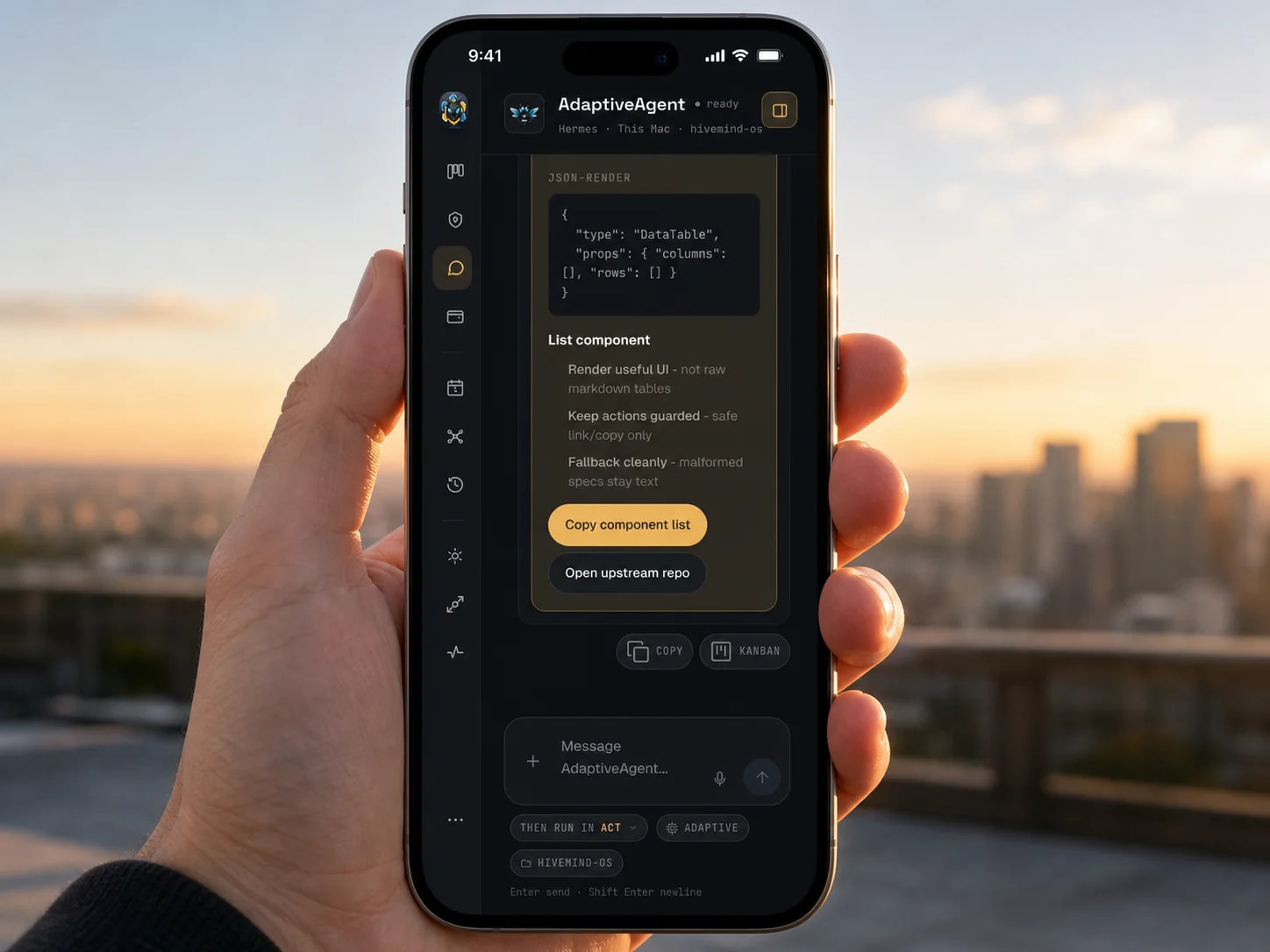
The same request should follow the same rules whether it starts on desktop, mobile, X, or inside an agent tool.
The same controls, everywhere

  • Ask for work from the surface that is most convenient at the moment.
  • Turn an X request into a draft, research task, or trade plan without skipping its normal review steps.
  • See the same plan, approval, limits, history, and receipt everywhere.
See 3 more
  • Review blocked work, urgent alerts, and safe approvals from mobile.
  • Stop an agent or revoke access without hunting through several settings pages.
  • See who requested an action, why the agent took it, what changed, and how to undo it when possible.
StageMobile command center
PlanBuildTestShip
The real HivemindOS mobile command interface displayed on a phone away from a desk
08In progress

Agent Run Companies

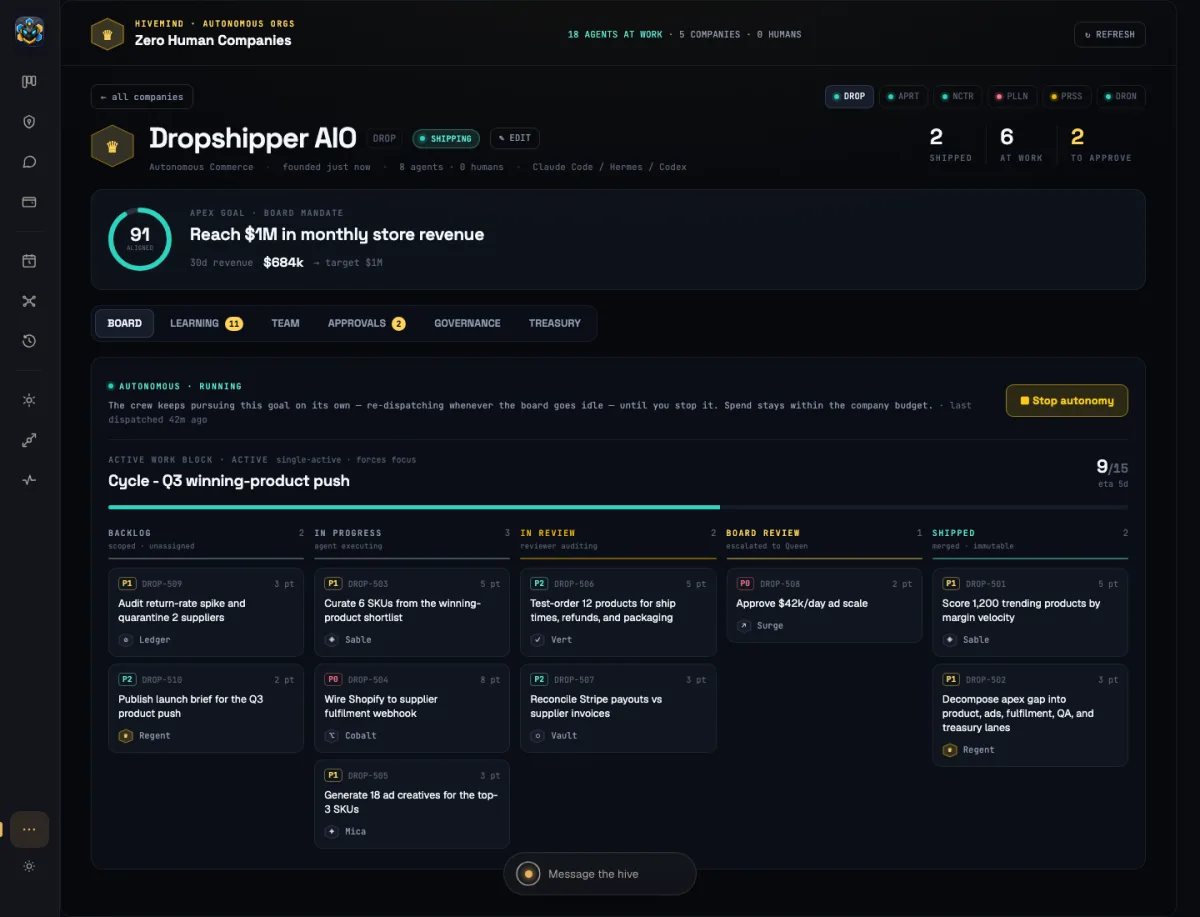
Zero Human Companies will let someone set a goal, assign a group of agents, talk to the company lead, track the budget, and review the work the company produces.
What we are building toward

  • Plans where agents can work on different parts at the same time and bring the results back together.
  • A permanent company lead you can chat with and redirect.
  • Clear budgets, spending controls, tasks, issues, and requests for human attention.
See 3 more
  • Deliverables that must be reviewed and accepted before they count as finished.
  • A Frontier Lab where a company can test ideas without gaining permission to spend, deploy, publish, or sell anything.
  • One history connecting the company's goals, decisions, work, revenue, spending, and results.
StageCompany cockpit
PlanBuildTestShip
HivemindOS Zero Human Companies cockpit with agent work, budgets, and approvals

More autonomy will come after the stop controls, spending freeze, recovery, and audit history work reliably.

Always / Product foundations

Work that supports every release

Some work matters across the whole product even when it is not the headline feature.

  • 01

    Make setup, updates, recovery, and troubleshooting easier.

  • 02

    Keep HivemindOS private by default and useful on a single computer.

  • 03

    Protect secrets and make permissions easy to understand and revoke.

See 5 more foundations
  • 04

    Keep research, paper actions, and real world actions clearly separated.

  • 05

    Give users control over posts, deployments, spending, trades, and destructive actions.

  • 06

    Make agent memory easier to review, correct, delete, and move between the agent tools people already use.

  • 07

    Build a searchable history of what every agent did and why.

  • 08

    Keep official prices, credits, subscriptions, and financial rules controlled by the official service instead of a setting that can be edited inside the app.

On the horizon

Later

Important directions that follow the current flight plan.

  • 01

    Android release after the iOS launch settles into a clear support rhythm.

  • 02

    Deeper agent work that can run fully on a phone without a server.

  • 03

    Separate workspaces for different projects, clients, models, memories, wallets, and rules.

See 3 more directions
  • 04

    Blind model comparisons so people can choose based on results instead of model names.

  • 05

    Better recommendations for which model should handle each job.

  • 06

    Easier self hosting and repair tools for people running HivemindOS on their own infrastructure.

The destination

More capable agents.
Clear human control.

The goal is not autonomy for its own sake. It is useful work across every machine and surface, with the same approvals, limits, history, and stop controls wherever you are.